
Read the canvas

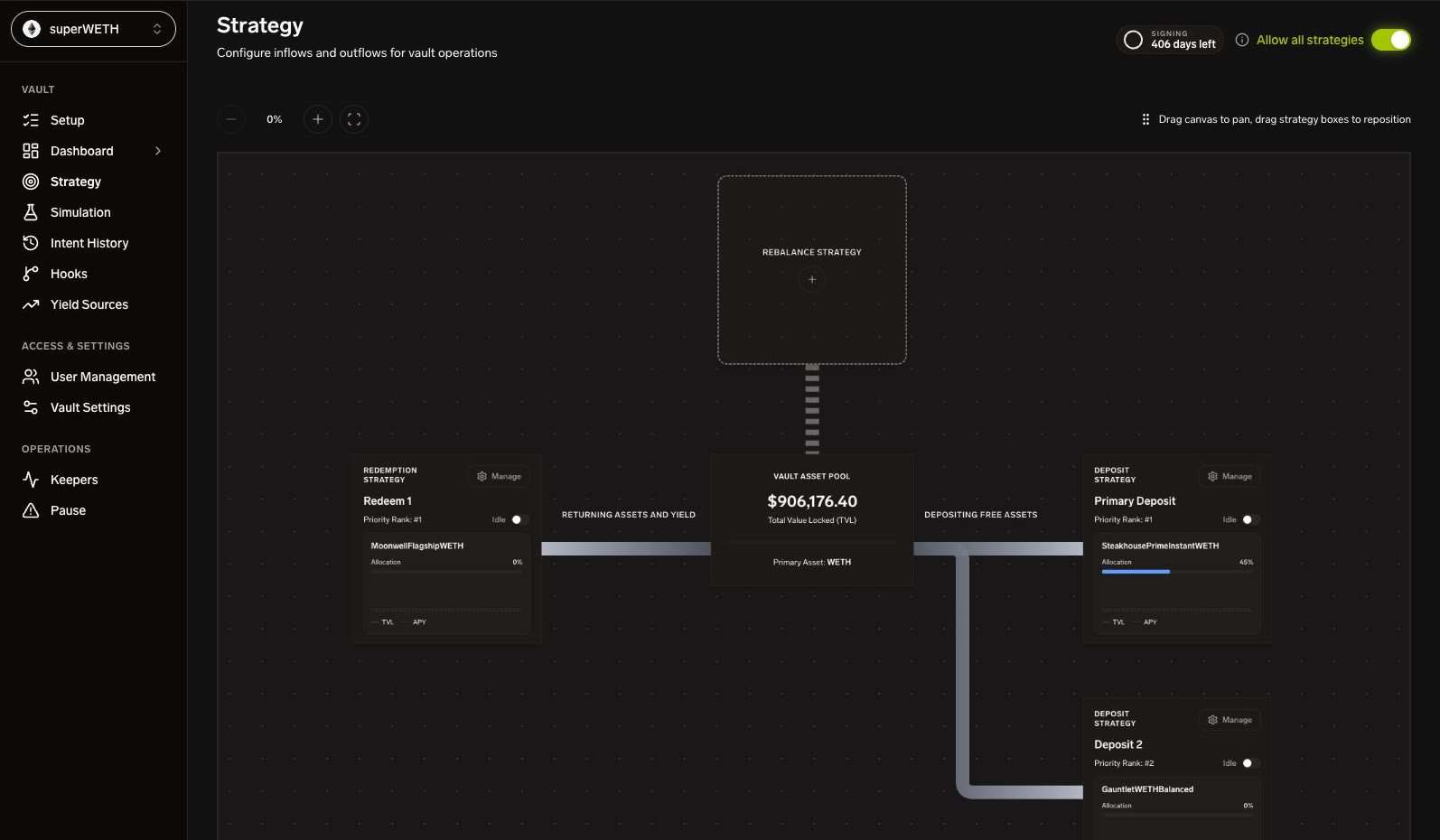
Existing superWETH canvas with redemption strategies on the left, the vault asset pool in the center, and deposit strategies on the right The screenshot shows an existing superWETH configuration, not the reserve exercise below. Read the canvas from the central Vault Asset Pool:
  • Deposit strategies deploy idle assets into a yield source.
  • Redemption strategies return assets from a source to idle.
  • Rebalance strategies configure other supported routes.
Choose a strategy card to inspect its definition where your role permits it. Public vault pages are read-only; access to a public canvas does not grant access to the manager editor.

Create or change a strategy

In the authenticated Strategy view, use Add deposit strategy for the reserve-deposit exercise. It uses one source, two rule conditions, and one size expression. Keep the exercise inactive. For an existing strategy, record its ID, version, target, and state before editing. Follow the safe-update sequence, rather than saving over a running definition. Create / Save persists configuration. Starting is a separate lifecycle action. Stopping prevents new strategy activity but does not cancel an intent already submitted to OMS.

Review order and blockers

Drag within a lane to change order. Priority is server-managed, not a create/update field. Ordering and per-strategy concurrency do not reserve a shared token balance across strategies. Card order does not sequence transactions or create execution dependencies between strategies. A session-key gate, vault kill switch, or target emergency lock can block execution. Resolve the cause; do not bypass it by creating another strategy. Emergency exits are managed in Pause Operations, not the normal editor. After an approved start, open Intent History to follow a real intent through its fill and transaction. For the expression and generated plan, use Strategy DSL and Action Config.