

Prepare endpoints return transaction data. They do not mutate protocol state by themselves. The connected wallet must sign and submit the transaction.
Access Model
Primary managers own sensitive vault settings. Secondary managers can operate the vault but do not control primary-only settings such as manager assignment and some security parameters. See Permissions Model for the full matrix.Fees
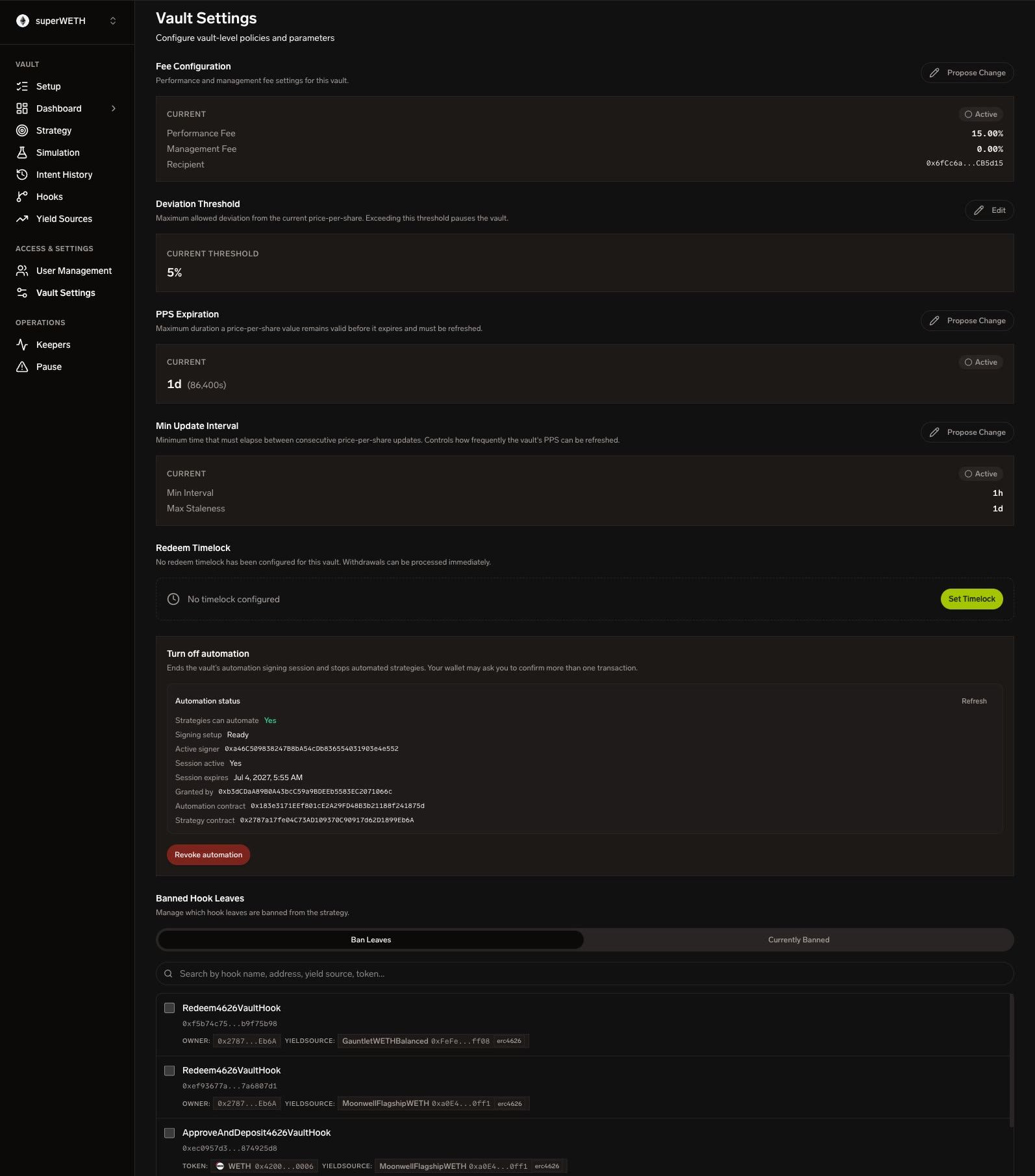
Configure the vault’s performance fee, management fee, and fee recipient. Fee changes protect depositors through the protocol’s proposal/timelock rules. The dashboard displays current values and prepares the required transaction when a primary manager proposes a change.PPS Parameters
Price-per-share controls define how often PPS can update and when stale data blocks operations. Common fields:- Deviation threshold — maximum allowed difference between calculated and current PPS.
- PPS expiration / staleness — when vault operations should stop waiting for a fresh PPS update.
- Minimum update interval — minimum time between PPS updates.
Redeem Timelock
Redeem timelock adds a delay between redemption request and fulfillment eligibility. Use it for:- Liquidity sourcing before fulfillment.
- Fraud and risk review windows.
- Regulatory or operational policy requirements.
Banned Hook Leaves
A banned hook leaf is blocked even if it appears in an authorized merkle tree. Use this to quickly stop a specific hook + parameter combination while you prepare a cleaner merkle config update. Banning a leaf is narrow: it blocks the exact leaf, not the entire hook category.Upkeep and Activation
Upkeep funds vault automation. It is also the practical activation gate for a new vault. The Upkeep panel shows:- Current upkeep balance.
- Upkeep token.
- Required balance and shortfall.
- Activation status:
activeorinsufficient_upkeep. - Whether the vault is active for keeper operations and discoverable in public listing surfaces.
- Pending upkeep withdrawal proposal, if any.
upkeep_info plus activation; upkeep withdrawal lifecycle is returned separately as withdrawal_status.
Deposit Upkeep
Managers deposit upkeep through the settings flow:Withdraw Upkeep
Withdrawals use a propose / execute pattern:Session Keys
Session keys delegate limited execution authority for automation. They are used by the OMS / Strategy Engine path so strategies can publish and execute intents without asking the manager wallet for every tick. Erebor exposes vault-scoped session-key inventory and prepare endpoints:
OMS also exposes strategy-automation session-key readiness and rotation endpoints. See OMS API.
Notification Channels
Notification channels attach Slack, webhook, or websocket destinations to a vault.
Use notification channels for operational alerts, monitoring, and downstream automation.
Alert Delivery
Alerts connect vault events to notification destinations. Treat alert delivery as operational plumbing: create the channel first, bind it to the vault, then verify delivery with a low-risk event before relying on it for incidents. Notification channel records include:
Recommended alert categories:
- Upkeep shortfall or activation loss.
- PPS staleness.
- Failed keeper runs.
- Session-key readiness changes.
- Emergency pause / unpause.
- Emergency liquidity exit arm / stop.
- Merkle generation or publish failure.
- Repeated OMS execution failure.